
Data center high-security locking is controlled physical access to critical rooms and equipment with the aim of preventing unauthorized entry while preserving safe exit and authorized maintenance. This 2026 guide to high-security locks for data centers explains how to match doors, keys, credentials, and emergency procedures without treating a stronger cylinder as a complete security system.
- Choose high-security locks for data centers around access zones, key control, and safe exit—not the lock alone.
- Apex Lock N Key provides commercial lock and access-control installation for Middlesex County businesses.
- Restricted keys limit uncontrolled duplication; electronic access supports individual permissions when properly configured.
- Test each secured door under normal operation, power loss, and authorized emergency access before accepting installation.
Why high-security locking matters for data centers
A data center door protects more than equipment. It controls access to systems, customer infrastructure, maintenance spaces, and physical connections that network permissions cannot protect. Your locking plan must distinguish between someone authorized to enter the building and someone authorized to reach a specific rack.
That distinction belongs in your 2026 facilities plan. A delivery contractor needs a different access route from a network engineer, and neither should receive broad access simply because administering separate permissions takes work.
Apex Lock N Key is best suited to Middlesex County businesses needing commercial lock and access-control installation. The licensed, 24/7 mobile locksmith provides those services; the inputs do not establish a specialized data center engineering offering. Discuss your facility requirements with Apex Lock N Key and keep security design, fire-safety approval, and system integration responsibilities explicit.
Strong hardware helps resist unauthorized entry. Its limitation is equally clear: it cannot stop someone using a valid shared credential, following an authorized person inside, or entering through a door left open.
How to choose and manage data center locks
Map your access zones before selecting hardware
Start with a floor plan or a spreadsheet. Mark each controlled opening, the space behind it, and the people who genuinely need access. You do not need new software to find an office credential that also opens a server room.
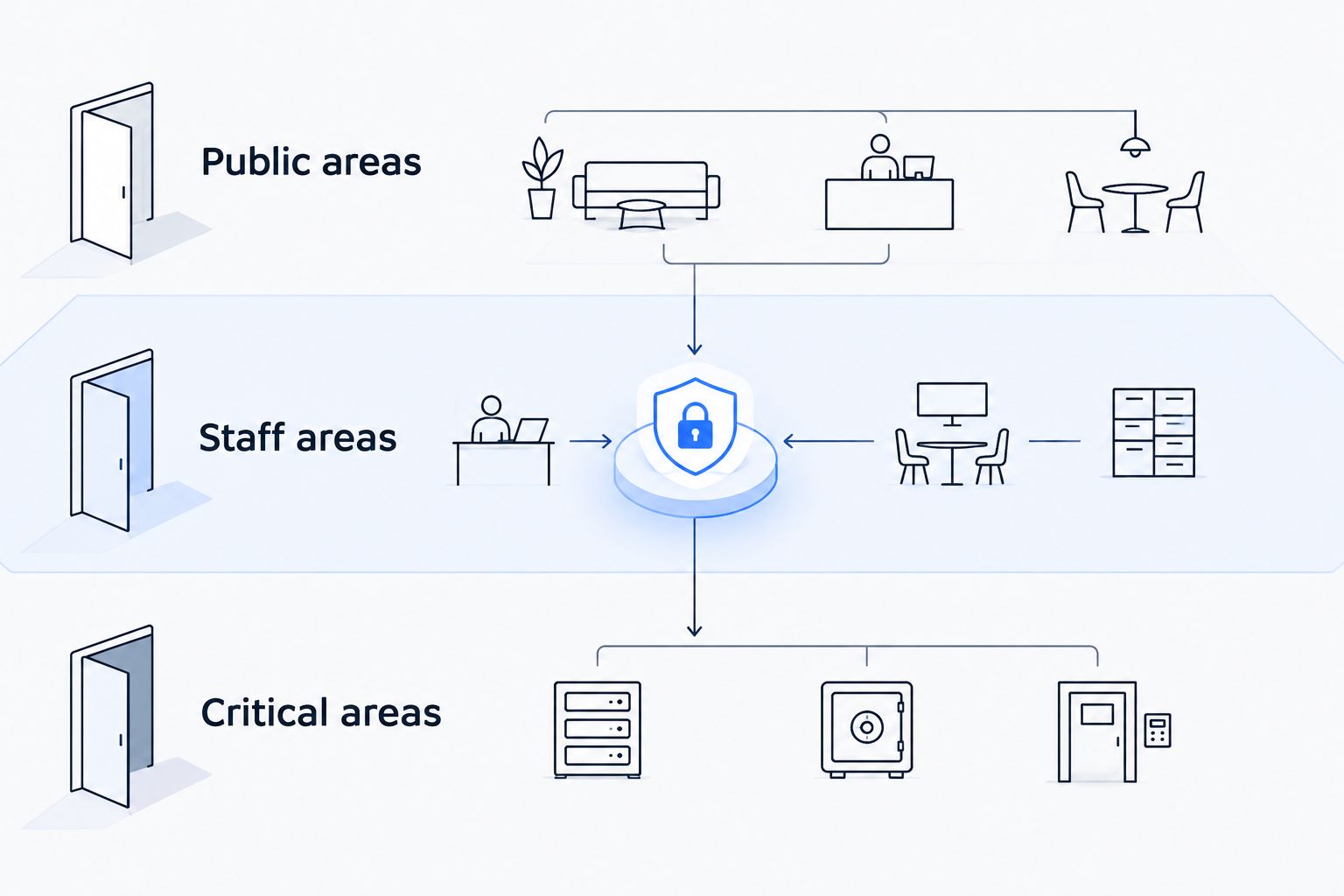
Use 3 access zones as a starting checklist: public areas, staff areas, and critical areas. These are planning categories, not a required facility layout. Split critical areas further wherever tenants, equipment ownership, or operational duties require separate permissions.
Include loading routes, electrical rooms, and network distribution spaces. A protected main entrance does not resolve an uncontrolled service door.
- Public areas: identify reception, visitor waiting, and delivery handoff points.
- Staff areas: separate ordinary workplace access from infrastructure access.
- Critical areas: identify server rooms, cages, racks, and supporting plant rooms.
- Assign an owner to every controlled door and access decision.
Define who approves access and who removes it
Write an access matrix before choosing a reader or cylinder. List roles against doors, then identify who approves employees, contractors, visitors, and emergency access. A simple shared document works when ownership and revision control are clear.
Keep 2 records separate: the authorization record and the issued-key or credential record. Approval describes what someone should access; issuance describes what they actually possess. Comparing them exposes permissions that outlast a contract or job change.
For your 2026 review, assign removal responsibility before the next departure happens. Electronic access only simplifies revocation when someone performs it and confirms the change reached the relevant doors.
- Define door permissions by job need, not seniority alone.
- Name an approver and a removal owner for each access group.
- Set expiration dates for temporary access where the system supports them.
- Reconcile issued keys and credentials against current authorization.
Inspect the complete door assembly
Begin with a physical inspection of each opening. Check whether the door closes fully, the latch engages, the frame is sound, and existing hardware operates without binding. Record faults before ordering a stronger lock.
A high-security cylinder does not correct a damaged frame or a closer that leaves the door ajar. Fire-rated openings also require compatible hardware and installation methods; do not drill or modify them without confirming the applicable requirements.
For commercial lock installation, Apex Lock N Key provides an on-site service path instead of leaving your team to perform the hardware work. Confirm the proposed scope and compatibility rather than assuming every existing assembly accepts every upgrade. The guide to high-security lock installation for homes and businesses provides related planning context.
- Record door material, frame condition, and existing hardware.
- Check latch engagement, hinges, closers, and strike alignment.
- Identify fire-rated openings before specifying alterations.
- Request manufacturer documentation for the exact proposed assembly.
Match the locking method to the access task
Decide what each door must accomplish before comparing options. A low-traffic equipment room with tightly managed keyholders has different needs from a contractor entrance requiring frequent permission changes. Rack access creates another boundary inside the secured room.
Restricted-key mechanical locks focus on physical key control. Electronic access focuses on credential administration and, where configured, event records. Neither replaces a sound door or an enforceable visitor procedure.
Use individual credentials where accountability matters. A shared code establishes that someone knew the code, not which person entered. Biometric authentication introduces enrollment, privacy, and fallback requirements rather than eliminating administration.
Avoid choosing every door by the feature list of the most expensive-looking device. Select the method that addresses the door's actual access problem.
- Match mechanical key control to stable, limited keyholder groups.
- Match electronic permissions to changing staff or contractor access.
- Reserve biometric authentication for a defined authentication requirement.
- Treat rack and cage locks as additional boundaries, not room-lock replacements.
Specify safe exit and failure behavior
Write down how every controlled door must behave during ordinary use, loss of power, loss of network connectivity, and an emergency. Separate outside entry behavior from inside exit behavior. They are related design decisions, not interchangeable settings.
Fail-safe locking unlocks on loss of power; fail-secure locking remains locked on loss of power. Those terms alone do not describe whether occupants can exit. Egress depends on the complete hardware arrangement and applicable requirements.
For a 2026 installation, have the responsible designer and local authority confirm the arrangement for each opening. Do not assume a backup battery or emergency key makes a door compliant.
- Document entry and exit behavior separately for every controlled opening.
- Identify dependencies on power, controllers, networks, and release devices.
- Confirm required emergency release and fire-system interactions.
- Write an authorized recovery procedure for failed electronic access.
Control mechanical overrides and spare keys
Start with a key register and a secure storage procedure. Record who holds each key, which doors it opens, and who can authorize another copy. Restricted duplication is useful only when the ordering and issuance process stays controlled.
An override cylinder deserves the same attention as the electronic reader. If a broadly issued mechanical key opens a restricted room, revoking a badge does not remove that person's complete access.
Master-key systems simplify authorized access across multiple doors, but a lost high-level key affects more openings than a narrowly assigned key. Do not give broad mechanical access merely to avoid carrying separate keys.
- Record every issued key, spare key, and mechanical override.
- Limit who can approve key duplication or replacement.
- Store emergency keys with a documented access and return process.
- Define which losses require rekeying, replacement, or an access investigation.
Test a pilot door and document acceptance
Start with 1 pilot door before repeating a new configuration across similar openings. This is a rollout recommendation, not a performance claim. Choose an opening that represents the proposed hardware and operating conditions without creating an uncontrolled security gap.
Test with facilities staff, the security owner, and the installer. Confirm approved entry, denied entry, normal exit, door closure, and the failure behaviors specified earlier. Record what happened rather than accepting a demonstration of the reader alone.
Apex Lock N Key offers commercial lock and access-control installation, but installation is only one part of acceptance. Your facility team must also verify permissions, recovery procedures, and any integrations covered by the project scope.
- Test an authorized credential and a revoked credential.
- Confirm the door closes and latches without manual assistance.
- Test specified power-loss and connectivity-loss behavior under controlled conditions.
- Record installed components, responsible contacts, and unresolved defects.
Compare locking options for data center doors
The best option depends on the boundary you are protecting. Compare physical resistance, permission management, and recovery needs separately; a device that performs well in one category does not automatically solve the others.
Ask for evidence tied to the exact hardware being proposed. A recognizable feature name is not a substitute for documented performance or a compatible installation.
| Option | Best for | Main advantage | Key limitation |
|---|---|---|---|
| Restricted-key mechanical locks | Low-change rooms with limited keyholders | Controlled key issuance without dependence on electronic access | Lost keys and permission changes require physical key-management action |
| Credential-controlled electric strikes or electrified locks | Staff entrances and restricted rooms with changing permissions | Individual access can be administered through a compatible control system | Performance depends on hardware, configuration, power, and maintenance |
| Standalone keypad locks | Limited-use spaces where centralized administration is unnecessary | Entry without distributing physical keys | Shared codes weaken individual accountability; administration varies by model |
| Biometric access integrated with door control | Openings with a defined identity-verification requirement | Authentication can depend on an enrolled physical characteristic | Enrollment, privacy, rejection handling, and fallback need explicit procedures |
| Rack or cage locking | Equipment-level separation within a secured room | Adds a boundary around designated equipment | Does not secure the room entrance or common service routes |
Choose restricted keys for controlled mechanical access; choose managed electronic credentials for changing individual permissions. Combine them only with a clear policy for the mechanical override.
No option in this table is a complete data center security program. Cameras, alarms, visitor supervision, and incident handling have separate jobs; purchasing a lock does not provide those functions.
Common mistakes data center operators make
Treating a hardware label as proof of suitability
A lock described as high-security still needs documented characteristics and a suitable installation. Ask what the specific certification or test covers, then compare it with your threat and door assembly. Mechanical resistance does not establish credential security.
Giving contractors the employee access route
A maintenance visit does not justify permanent access to every critical area. Approve the required route, decide whether escorting is necessary, and remove temporary permissions after the work. Keep delivery handoffs outside restricted rooms whenever the work allows it.
Securing server rooms but ignoring supporting spaces
Network closets, electrical rooms, and service corridors belong in the access map. Protecting racks while leaving their supporting infrastructure outside the plan creates an incomplete boundary. Give each supporting space its own access owner and review.
Leaving the mechanical override outside the audit
An electronic access report does not prove that all entry paths are controlled. Review override keys alongside badges and codes during your 2026 access audit. A removed digital permission means little if the same person retains a working key.
Accepting installation without an operating handoff
Your team needs more than working hardware on installation day. Require instructions for credential removal, key ordering, fault reporting, and emergency recovery. Identify who supports each component rather than assuming the locksmith handles every connected system.
FAQ
What's the best type of high-security lock for a data center?
The best type depends on whether the door needs controlled mechanical keys, frequently changing individual permissions, or equipment-level separation. Use restricted-key locks for tightly managed keyholders and compatible electronic access for centrally administered permissions; inspect the complete door assembly in either case.
Are electronic locks more secure than mechanical locks for server rooms?
Electronic locks are not automatically more secure than mechanical locks. They support credential administration when properly configured, while physical resistance depends on the installed hardware and door assembly; a mechanical override remains a separate access path.
Does a high-security cylinder stop people following someone through a door?
A high-security cylinder does not stop someone following an authorized person through an open door. Visitor supervision, staff procedures, door monitoring, and any suitable entrance controls address that problem separately.
Should data center doors unlock when the power fails?
Power-loss behavior must be specified for each door together with its required exit behavior. Fail-safe and fail-secure describe locking behavior on loss of power, not the complete egress arrangement; confirm the design with the responsible professional and local authority.
Do we need biometric locks for a data center?
Biometric locks are not a universal requirement for data centers. Use biometric authentication only when a defined security requirement justifies its enrollment, privacy, maintenance, and fallback procedures.
What should we do if a server-room override key is lost?
Treat a lost server-room override key as an access-control incident. Identify the doors it opens, apply the facility's temporary security procedure, and arrange the rekeying or replacement needed to remove the lost key's access.
Can Apex Lock N Key install commercial locks in Middlesex County?
Apex Lock N Key provides commercial lock and access-control installation in Middlesex County, Massachusetts. Confirm the proposed hardware, installation scope, and coordination responsibilities for your facility before scheduling work.
One last thing
Test the door, not just the credential. A reader can correctly approve or reject access while the physical door fails to latch. Make complete closure part of your 2026 acceptance checklist, then repeat the check whenever hardware adjustments or building work affect the opening.