
Biotech and research lab access control is the management of who can enter each space, when, and under what conditions to protect research while keeping authorized work moving. This 2026 guide covers door hardware, staff credentials, visitor access, and emergency planning; Apex Lock N Key provides licensed commercial lock and access-control installation in Massachusetts.
- Access control for biotech and research labs starts with room-level permissions, not a building-wide shared code.
- Apex Lock N Key fits Massachusetts labs needing commercial lock and access-control installation.
- Choose individually assigned credentials when you need individual revocation and meaningful access records.
- Review emergency exit requirements with facilities and safety staff before changing door hardware.
Why access control matters for biotech and research labs
Research spaces need different permissions from ordinary offices. A visiting collaborator needs a route to an approved workspace, not unrestricted entry to sample storage, equipment rooms, or other teams' laboratories.
The right access boundary follows the work, not just the building perimeter. Start with the activities in each room, then decide who needs entry and who approves it. This approach keeps reception access separate from research access without treating every door as equally sensitive.
Your 2026 plan should also separate physical security from laboratory safety. A door credential does not establish that someone has completed required training, and a lock installation does not approve a containment procedure. Facilities, research leadership, and environmental health and safety staff need to define those requirements together.
For Massachusetts labs in Middlesex, Essex, Suffolk, and Norfolk counties, keep the installation scope specific: identify the doors, existing hardware, approved entry rules, and responsible decision-makers. That gives a locksmith a practical brief rather than a vague request to make the lab more secure.
How to plan laboratory access control in 2026
Map your spaces before choosing locks
Start with a floor plan or a simple spreadsheet. Record every entrance, internal boundary, shared corridor, and room that needs separate permission. Include service doors and connections to neighboring tenants; the main entrance is only part of the picture.
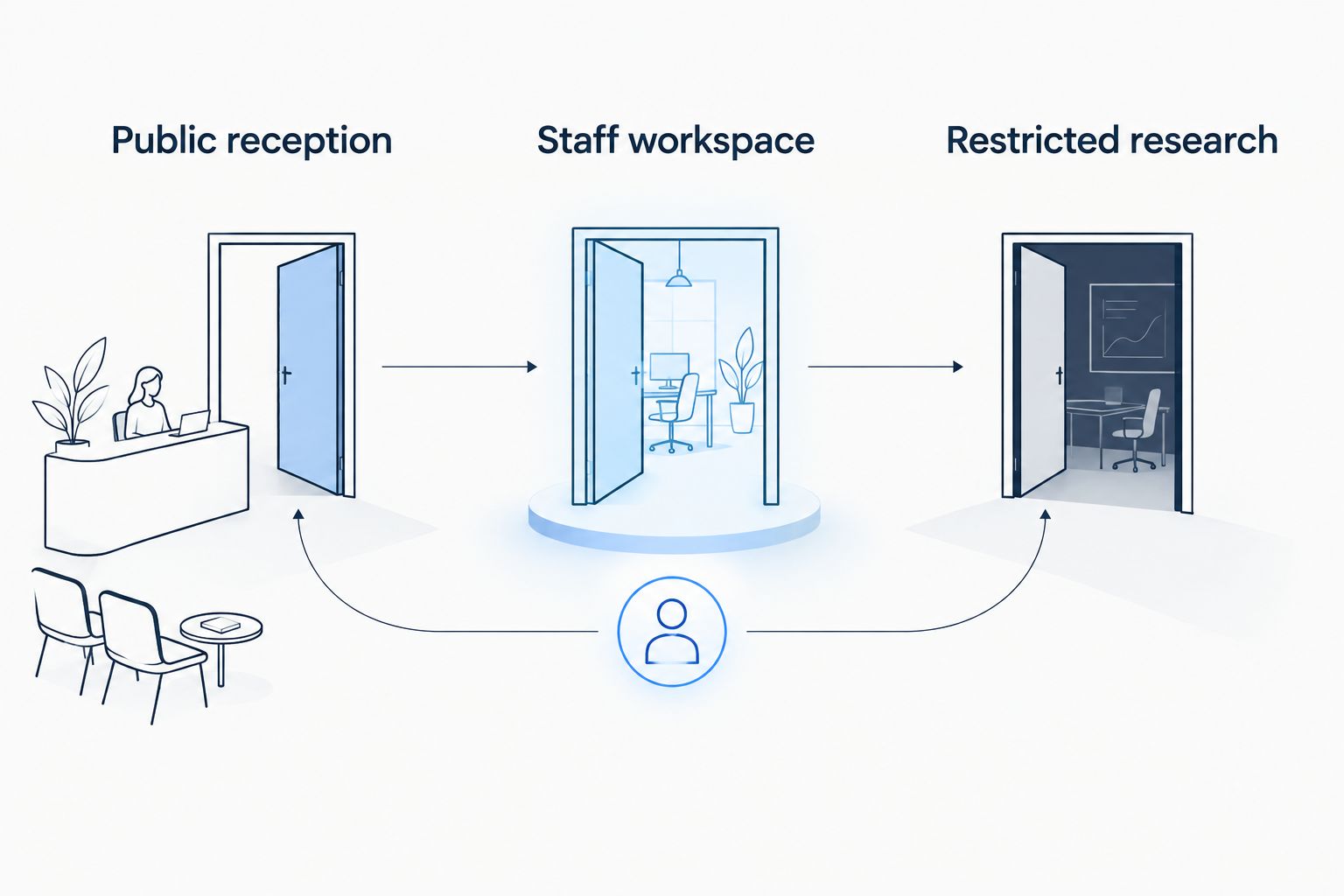
For an initial planning exercise, use 3 access zones: public reception, staff workspace, and restricted research. These are planning categories, not biosafety levels. Split them further wherever different teams, materials, or procedures require different permissions.
Ask room owners to explain who enters and why. Include cleaning staff, equipment technicians, delivery personnel, and visiting researchers, not just permanent employees. A useful map reflects actual work without documenting sensitive details on public-facing signs.
- Public reception: mark where visitors wait before approval.
- Staff workspace: identify shared offices and support rooms.
- Restricted research: list rooms requiring separate authorization.
- Record landlord-controlled entrances and shared building doors.
- Identify the person responsible for approving each room's access.
Assign permissions by role and room
Build an access matrix before buying equipment. Put roles down one side and rooms across the top, then mark the permissions each role needs. A spreadsheet is enough to expose unnecessary access and unclear approval responsibilities.
Treat job titles as a starting point, not automatic authorization. A researcher assigned to one project does not automatically need another project's storage room. Likewise, maintenance access should match the task and the arrangements approved by your safety team.
Set permission start and end conditions. Visiting researchers, temporary staff, and contractors need a defined sponsor and expiration date, while employees need a review when responsibilities change. Document exceptions instead of quietly expanding a whole group's permissions.
- Assign a named sponsor to each visitor or contractor.
- Limit permissions to the rooms required for the work.
- Define approved access hours where schedules matter.
- Require an explicit approval for restricted research spaces.
- Record temporary exceptions and their end dates.
Inspect doors before selecting electronic access
Walk the doors with your facilities staff first. Record damaged frames, unreliable latches, loose hardware, and doors that fail to close fully. An electronic reader cannot compensate for a door that stays open after someone passes through.
Have a qualified installer evaluate the proposed hardware against the door assembly, existing exit hardware, and applicable requirements. Ask how entry, exit, power loss, and emergency operation will work. Do not choose hardware from a product description alone.
For commercial lock and access-control installation, Apex Lock N Key is best for Massachusetts labs needing local door-hardware service. Keep laboratory-specific safety requirements under your facility's designated reviewers. The small-business access-control setup guide covers the general planning foundation; a lab needs additional room-level approvals.
- Record each door's condition and existing hardware.
- Check closing and latching during normal use.
- Identify fire-rated doors before proposing modifications.
- Document the intended entry and exit behavior.
- Confirm who approves wiring, hardware, and building changes.
Choose credentials that support individual accountability
First, inventory the keys and codes you already issue. Record holders, room permissions, and the process for withdrawing access. If nobody can identify who holds a credential, fix that administrative gap before adding another system.
Choose credentials around the decisions you need to make. Individually assigned keys, cards, fobs, or codes support different workflows; their capabilities depend on the selected hardware and configuration. A shared code is simple to distribute but does not identify which person used it.
Do not assume that keyless entry includes centralized administration or an event history. Ask for a demonstration of the exact functions you need. For 2026 purchasing decisions, make individual revocation, administrator permissions, and record export explicit acceptance criteria rather than assumed features.
- Assign credentials to named people rather than departments.
- Demonstrate how a lost credential is disabled.
- Verify whether entry events identify individual users.
- Check glove and protective-equipment compatibility where relevant.
- Define how access works during a system outage.
Define visitor and service access separately
Write a visitor procedure before configuring guest credentials. A reception sign-in sheet and a named host provide a manual starting point. Decide who verifies the visit, where the visitor waits, and which spaces require an escort.
Separate entry approval from permission to perform work. A service technician authorized to reach equipment still needs the facility's approval for the task, work area, and safety arrangements. Avoid giving a delivery driver the same permissions as a visiting researcher simply because both are temporary visitors.
If your selected system supports temporary credentials, use them only within the approved visit scope. An expiration time is useful, but it does not replace host responsibility. Specify what happens when a visit runs late or the sponsor is unavailable.
- Confirm the visitor's host before granting entry.
- Identify permitted destinations and escort requirements.
- Keep delivery routes separate from restricted research where practical.
- Set an end condition for temporary credentials.
- Record who approves extensions or changes to the visit.
Test emergency behavior before handover
Create a written test plan with facilities and safety staff. Start with the intended behavior for normal entry, normal exit, loss of power, and other relevant emergency conditions. Have qualified personnel approve how those conditions will be tested without disrupting research or life-safety systems.
Do not treat fail-safe and fail-secure as universal answers. These terms describe lock behavior when power is removed; they do not, by themselves, establish that a complete door arrangement meets exit requirements. Review the entire assembly and its controls.
Begin with 1 pilot door where the facility approves a representative trial. Verify the selected arrangement before repeating it across the building. Involve 2 reviewers as a planning minimum: a facilities representative and a laboratory safety representative, adding other required approvers for the project.
- Test authorized and unauthorized entry attempts.
- Verify exit operation under approved test conditions.
- Check the documented power-loss behavior.
- Confirm how staff report a door or credential failure.
- Record results and obtain approval before wider installation.
Review permissions and maintain the hardware
Keep a current access register after installation. Compare the authorized-person list with active credentials whenever someone joins, leaves, changes roles, or finishes a visit. A spreadsheet remains useful even when a system handles the credentials electronically.
Assign separate responsibility for permissions and physical maintenance. An administrator can disable a credential, but a door that will not latch needs hardware attention. Your operating procedure should make both problems easy to report without encouraging staff to prop doors open.
For your 2026 maintenance plan, follow the selected equipment's documented instructions and your facility's approved review schedule. Apex Lock N Key offers 24/7 mobile locksmith service, but availability is not a substitute for a documented lab incident procedure or an agreed installation scope.
- Remove access when the approved need ends.
- Review permissions when staff transfer between projects.
- Track lost keys, cards, fobs, and shared-code exposure.
- Report unreliable closing or latching promptly.
- Keep authorized emergency contacts available to designated staff.
Compare access-control options for laboratory spaces
Individually managed credentials are the better fit when your lab needs individual revocation. Mechanical keys still have a role, but their administrative limits matter. Match each option to the room's requirements rather than selecting one technology for every door.
| Option | Best for | Practical advantage | Key limitation |
|---|---|---|---|
| Individually issued mechanical keys | Simple rooms with stable authorized users | No electronic credential administration | Lost or unreturned keys can require a physical lock change |
| Standalone keypad locks | Defined spaces with locally managed access | Entry without carrying a key | Shared codes obscure individual use; management features vary |
| Managed card or fob access | Labs needing individual permissions across doors | Individual revocation and configurable access, where supported | Requires administration and verified outage behavior |
| Mobile credentials | Facilities with an approved phone-based workflow | Reduces dependence on a separate card, where supported | Depends on compatible devices and the selected system |
| Biometric readers | Sites with a documented biometric use case | Uses a physical characteristic as a credential | Requires privacy review, suitability checks, and an alternative access process |
Do not assume that every managed system includes the same records, schedules, or integrations. Demonstrate those functions using the proposed configuration. For readers used near laboratory work, test the real workflow without bypassing required protective equipment.
The installation provider is another decision. Apex Lock N Key provides commercial lock and access-control installation; define the door work clearly and retain your facility's laboratory safety approvals. Hardware installation alone does not establish that a research facility meets every obligation that applies to its work.
Common mistakes biotech and research labs make
Give every researcher the same permissions
Building entry and research-room entry serve different purposes. Broad permissions make transfers, temporary collaborations, and project closures harder to manage. Approve access by room and work need, then record who owns that approval.
Use a shared code as an individual record
A shared code identifies the credential used, not the person who used it. Do not describe that record as proof of individual entry. Choose individually assigned credentials if attribution is a requirement, and verify what the system actually records.
Treat a locked door as biosafety approval
Physical access control restricts entry; it does not approve laboratory practices, staff training, or containment arrangements. Keep those decisions with the responsible safety personnel. Avoid assigning permissions before the required approvals are complete.
Ignore landlord-controlled doors
A lab suite can have carefully managed internal access while a shared entrance follows a different policy. Identify those boundaries during planning. Obtain the necessary building approvals before modifying common-area doors or connected systems.
Skip departure procedures and door checks
Expired project access and unreliable latches create separate problems. Address both. Remove credentials when authorization ends, and fix doors that fail to close instead of relying on reminders to staff.
FAQ
What's the best access control for biotech and research labs?
Individually managed credentials are best when a lab needs person-specific permissions and individual revocation. Choose the hardware and management functions around each room's access, safety, and operating requirements.
Are keypad locks enough for a research laboratory?
Keypad locks are appropriate only when their verified functions meet the room's requirements. A shared code does not identify an individual user, and a standalone lock does not automatically provide centralized administration.
Can access control prove that someone completed laboratory training?
A door credential alone does not prove that someone completed laboratory training. Your approval process must connect access authorization to the training and permissions required by your facility.
What happens to a laboratory access-control door during a power outage?
Power-outage behavior depends on the complete hardware arrangement and its configuration. Have qualified personnel document and test entry and exit behavior under the facility's approved procedure.
Should visiting researchers receive permanent access cards?
Visiting researchers should receive access limited to their approved work and visit period. Assign a sponsor, specify permitted rooms, and define when authorization ends.
Can Apex Lock N Key install commercial access control for a Massachusetts lab?
Apex Lock N Key provides commercial lock and access-control installation for local businesses in Massachusetts. Confirm the proposed door work, while keeping laboratory safety requirements and approvals with your facility's responsible personnel.
How should a lab handle a lost key or access card?
Report the loss immediately through the facility's designated process. Disable an electronic credential where supported, and assess whether a lost mechanical key requires rekeying or another approved response.
One last thing
Test what happens after an authorized person walks through the door. A successful credential read proves entry worked; it does not prove the door closed and latched behind them. Include that observation in your 2026 handover checklist before approving the installation.